Convert Windows 11 Enterprise Evaluation to Full Version : Step-by-Step Guide
Step 1: Purchase a Genuine Windows 11 Enterprise Key
Visit ProSoftKeys to buy a legitimate Windows 11 Enterprise key.
For LTSC 2024, get the correct version here: Windows 11 Enterprise LTSC 2024 Key
VERY IMPORTANT :
If you receive a conversion failure with “Non-Core Edition” error while activating your LTSC 2024 key, please contact us at contact@prosoftkeys.com. We’ll provide you with the official full version ISO download link to perform a clean installation.
Download the Windows 11 Enterprise Evaluation ISO file from the official Website.
Complete the installation and log in to your system.
- You need Administrator access to your computer and a stable internet connection
Step 2: Download Required SKUs
If you’re using an evaluation version, you need to download the necessary SKUs (Stock Keeping Units) to enable the conversion process. Download :
- After downloading the Enterprise SKU ZIP File, extract it

- Now copy the Enterprise Folder and paste it to the Skus folder Path- C:\Windows\System32\spp\tokens\skus


Step 3: Run Commands to Reset Licensing
Open Command Prompt as Administrator.
- type the following command. cd
C:\Windows\System32\spp\tokens\skus - Run the following commands one by one:
cscript.exe %windir%\system32\slmgr.vbs /rilc cscript.exe %windir%\system32\slmgr.vbs /upk >nul 2>&1 cscript.exe %windir%\system32\slmgr.vbs /ckms >nul 2>&1 cscript.exe %windir%\system32\slmgr.vbs /cpky >nul 2>&1 cscript.exe %windir%\system32\slmgr.vbs /ipk NPPR9-FWDCX-D2C8J-H872K-2YT43 sc config LicenseManager start= auto & net start LicenseManager sc config wuauserv start= auto & net start wuauserv
This generic key will convert your evaluation version to the full Windows 10/11 Enterprise edition but will not activate it.

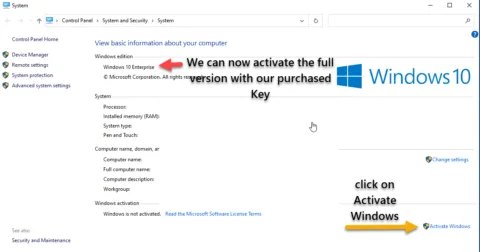
Step 4: Activate Windows 11 Enterprise with a Genuine Key
Go to
Settings > System > Activation.Click on Change Product Key and enter your genuine Windows 11 Enterprise (LTSC) key purchased from ProSoftKeys.
Follow the on-screen instructions to complete the activation.

FAQ: Convert Windows 11 Enterprise Evaluation to Full Version
Q1: Can I convert Windows 11 Enterprise evaluation to full version?
A: Yes. Windows 11 Enterprise evaluation can be converted to full Windows 11 Enterprise using this guide.
Note: Windows 11 Enterprise LTSC 2024 evaluation also converts to standard Windows 11 Enterprise (not LTSC).
Q2: Will this conversion work for Windows 11 Enterprise LTSC 2024 evaluation?
A: Partially. This process works on Windows 11 Enterprise LTSC 2024 evaluation, BUT it converts to Windows 11 Enterprise (standard edition), not LTSC.
What happens:
- ✅ Evaluation converts successfully
- ✅ Becomes fully activated when using Windows 11 Enterprise Key
- ❌ Loses LTSC status (becomes standard Enterprise with regular updates)
If you need LTSC 2024 full version: Perform clean installation with official LTSC 2024 ISO using Windows 11 Enterprise LTSC 2024 key.
Q3: What’s the difference between Windows 11 Enterprise and Enterprise LTSC after conversion?
A: After converting LTSC 2024 evaluation, you get standard Windows 11 Enterprise:
Feature | Windows 11 Enterprise (after conversion) | Windows 11 Enterprise LTSC 2024 |
Support Duration | 36 months per version (rolling updates) | 5 years total (until 2029) |
Update Model | Annual feature updates required | Security-only updates |
Apps Included | Microsoft Store, consumer apps | Minimal apps, no Store |
Update Frequency | New version every year (must upgrade) | Monthly security patches only |
Support Type | Continuous (Modern Lifecycle) | Fixed 5-year lifecycle |
Ideal For | General enterprise needing latest features | Specialized systems (5-year planning) |
Q4: Do I lose my data when converting evaluation to full version?
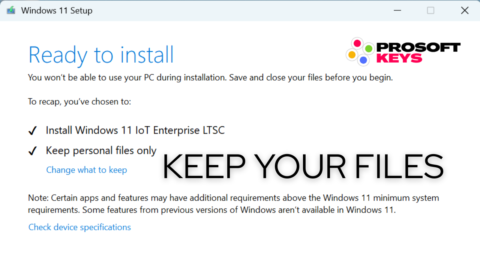
A: No. This method preserves :
- ✅ All installed programs
- ✅ User files and documents
- ✅ Settings and configurations
- ✅ Desktop items and downloads
Q5: How long does the conversion process take?
A: Typically, 5 to 10 minutes, following computer and internet speed.
Q6: What product key do I need to convert Windows 11 Enterprise evaluation?
A: You need a Windows 11 Enterprise product key (not LTSC, not Pro).
Get genuine key: Buy Windows 11 Enterprise Key
Key types that work:
- ✅ Retail Windows 11 Enterprise key
- ✅ Volume (MAK) Windows 11 Enterprise key
- ❌ Windows 11 Pro key (wrong edition)
- ❌ Windows 11 LTSC key (incompatible with conversion)
Q7: Will my Windows 11 Enterprise activation be permanent after conversion?
A: Yes. Once converted with a genuine product key, your Windows 11 Enterprise activation is permanent and lifetime.
Watch the Full Step-by-Step Video Tutorial!
If you prefer a visual guide, check out our video tutorial on how to convert Windows Enterprise Evaluation to a full production version:
This video walks you through each step with on-screen instructions, commands, and explanations to ensure a smooth activation process. Don’t forget to like & subscribe for more helpful tutorials!